Accu-Chek® Guide
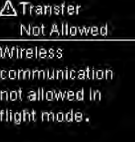
Error codes Transfert Not Allowed
Data cannot be sent to a paired device because the meter is in Flight Mode.
Retry the data transfer when the meter is not in Flight Mode.
For health professionals 

Data cannot be sent to a paired device because the meter is in Flight Mode.
Retry the data transfer when the meter is not in Flight Mode.
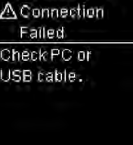
Data could not be transferred from the meter to the PC.
Check the PC or USB cable.
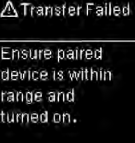
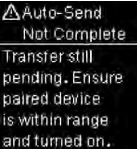
Blood glucose results were not transferred to a paired device.
Make sure the paired device is within range of the meter and turned on.
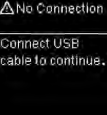
There is no connection between the meter and PC.
Connect the USB cable and retry the connection.
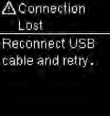
The connection between the meter and PC was lost.
Disconnect and reconnect the USB cable and retry the connection.
Contact Accu-Chek Customer Care at 1-800-363-7949 if the connection is lost again.
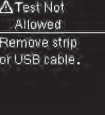
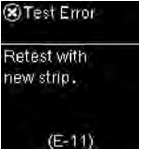
The meter is connected to a PC and a test cannot be performed.
EITHER remove the USB cable and perform a test OR remove the test strip and start a data transfer.
Possible causes and solutions for sudden power loss include:
| Issue: | Solution: |
|---|---|
| The meter automatically turns off after 90 seconds of inactivity. | Turn the device back on when you’re ready to use it again. |
| After completion of a blood glucose measure, the meter automatically turns off 15 seconds after strip removal. | Turn the device back on when you’re ready to use it again. |
| The battery compartment or battery door is faulty or damaged. | Please contact Accu-Chek Customer Care. |
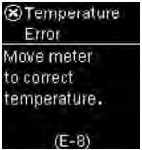
| The meter has been stored in extremely cold conditions (below 30°F / - 1°C). | Move to an area where the temperature is within the system's operating temperature range. Wait at least 15 minutes for the meter to equilibrate. |
| The meter is connected to a computer via the USB cable and a compatible software application is not installed on the computer. | Disconnect the cable and attempt to turn the meter on by pressing and releasing the power button. |
| The meter is connected to a computer via the USB cable and a compatible software application has turned off the meter. | Disconnect the cable and attempt to turn the meter on by pressing and releasing the power button. |
Check other FAQ categories by clicking on the below category names.
All your diabetes data in one place.

All your diabetes data in one place.

Refer to mySugr.com for the latest information on product specifications and restrictions.
In Canada, the mySugr app is compatible with the Accu-Chek Guide meter.
The mySugr app is compatible with the following services and/or apps in Canada:
Apple Health®
Google FitTM
Enjoy all the benefits and features of mySugr PRO** for FREE by pairing a compatible Accu-Chek device to the app.

Need help with your Accu-Chek products? We’re here to troubleshoot with you.
Get product supportEnjoy mySugr PRO** for FREE by pairing an Accu-Chek Guide meter to the app. Don't have an Accu-Chek Guide meter? Get it now!
Get your FREE*** meter now*Estimated A1c (eA1c) is based on your logged or imported measurements and does not replace actual A1c measurements. To get your eA1c, you must log or import your blood sugar levels 3 times a day for 7 days.
**In order to maintain access to all PRO features, you must transfer your blood sugar values at least once every 30 days.
***Purchase of Accu-Chek Guide strips might be required. This offer only applies to a new Accu-Chek Guide user. Limit of one (1) offer per person for a period of 12 months; additional requests will not be processed.
Preloaded in drums for your convenience.

Preloaded in drums for your convenience.

Refer to the package insert that came with your lancing device for the latest information on device specifications and product restrictions.
0.7 to 2.2 mm
105 mm x 20 mm (length x width)
20.0g
11 depth settings, depth selection by rotating the cap
Press once to lance
Yes, AST capability is available upon request
For individual use only:
The Accu‑Chek FastClix lancing device is intended for personal use only. It is only allowed to be used to obtain blood from one person. There is a risk of infection being transmitted if the lancing device is used by other people, even by family members, or if healthcare professionals use this lancing device to obtain blood from different people. This lancing device is therefore not suitable for professional use in healthcare facilities and institutions.
Environmental needs:
Uncritical plastic material, Biocompatible materials, Latex-free
Display:
Yes. The number of available lancets is indicated on the window next to the lever.
New vs. used drums:
A red mark is displayed on a used drum.
Can I reuse a disposed or removed drum?
No, not without misuse.
Can I reuse lancets?
Always use a new lancet when you obtain blood. In doing this, you reduce the risk of infection, and obtaining blood remains virtually pain free.
Silicone coated:
No
Latex-free:
Yes
Needle cut:
3 facet-cut
Click action enables you to prime and release in one simple action. This makes it quick and more convenient to obtain a blood sample as there are fewer handling steps. Always wash and dry hands before obtaining a blood sample.
Inserting a drum
Setting the penetration depth
Turn the rotatable cap to select from 11 settings. Start with 2 and adjust according to your skin type.
Obtaining a blood sample
Push the release button to prime and release in a 1-Click action.
Loading a new lancet
There is a lever next to the window showing the number of available lancets. Slide the lever back and forth to change to a new lancet. The number in the window changes, telling you how many lancets remain in the drum.
The Accu‐Chek FastClix lancing device is intended for personal use only. It is only allowed to be used to obtain blood from one person.
Only insert Accu-Chek FastClix lancet drums into the Accu‐Chek FastClix lancing device. Other lancets or lancet drums may impair the operation of the lancing device or damage it permanently.
Do not store the lancing device at extreme temperatures, for example, in a hot car. This can impair the operation of the lancing device.
Always use a new lancet when you obtain blood. In doing this, you reduce the risk of infection, and obtaining blood remains virtually pain free.
Only use the lancing device when the cap is attached. Without the cap, the lancet penetrates too deeply and may cause discomfort.
The cap can only be correctly placed up to the stop position when the lancet drum is completely inside the lancing device. Do not use any force to place the cap on as this might damage the cap and the lancing device. Correct the position of the lancet drum instead.
Do not remove the lancet drum before all 6 lancets have been used. The lancet drum cannot be reinserted once it has been removed from the lancing device.
This product contains small parts that can be swallowed. Keep the small parts away from small children and people who might swallow small parts.
Discover products related to the Accu-Chek Fastclix.

Still looking for the right lancing for you? Explore similar products.

From FAQs to product manuals, explore our online support resources to find the information you need whenever you need it.
Product Support1 Kocher S, Tshiananga JK, Koubek R. Comparison of lancing devices for self-monitoring of blood glucose regarding lancing pain. J. Diabetes Sci Technol 2009; 3: 1136-43
2 Lekarcyk J, Ghiloni S. Analysis of the comparison of lancing devices for self-monitoring of blood glucose regarding lancing pain. J. Diabetes Sci Technol 2009; 3: 1144-45
Disposal:
Items used by individuals to inject medications or monitor their health condition may have come into contact with blood and must be disposed of properly. To prevent infections from being transmitted, dispose of the following items as medical sharps in an approved sharps container according to the regulations applicable in your province; Accu-Chek® Softclix lancing devices, Accu-Chek® Softclix lancets, Accu-Chek® FastClix lancing devices, Accu-Chek® FastClix lancet drums and sitesmart™ pen needles. For information about correct disposal, contact your local authority. Please refer to the instructions of use for more information
Virtually pain-free. Easy to use.

Virtually pain-free. Easy to use.

Refer to the package insert that came with your lancing device for the latest information on device specifications and product restrictions.
0.5 to 5.5 mm
21.0g
11 fixed-depth options, set with the rotatable cap
0.4mm, 28 guage
Accu-Chek Softclix lancet
Pull off the cap. Insert a new lancet into the lancet holder and push it in until it clicks.
Twist and remove the protective cap to expose the needle.
Press the cap on again until it clicks.
Rotate the cap until the desired penetration depth is set.
Press the priming button down until it clicks.
Press the lancing device firmly against the side of the fingertip.
Press the yellow release button.
After measuring your blood glucose, pull off the cap and slide the ejector forward to remove the lancet.
Always use a new lancet when you obtain blood. In doing this, you reduce the risk of infection, and obtaining blood remains virtually pain-free.
The lancing device is for single-patient use only and should not be shared.
The Accu‐Chek Softclix lancing device is intended for personal use only. It is only allowed to be used to obtain blood from one person.
Only insert Accu-Chek Softclix lancets into the Accu‐Chek Softclix lancing device. Other lancets may impair the operation of the lancing device or damage it permanently.
Do not store the lancing device in a primed state. Store the lancing device only without a lancet inserted.
Do not store the lancing device at extreme temperatures, for example, in a hot car. This can impair the operation of the lancing device. Store and use at room temperature.
Always use a new lancet when you obtain blood. In doing this, you reduce the risk of infection, and obtaining blood remains virtually pain-free.
If the protective cap is damaged or missing, the needle can be unsterile and lead to infection. Visually inspect the lancet. If the protective cap is deformed, cracked, or otherwise damaged, do not use the lancet. If the protective cap is missing or any part of the needle is exposed, do not use the lancet. Discard the lancet.
This product contains small parts that can be swallowed. Keep the small parts away from small children and people who might swallow small parts.
Discover products related to the Accu-Chek Softclix
Still looking for the right lancing device for you? Explore similar products.

From FAQs to product manuals, explore our online support resources to find the information you need whenever you need it.
Product Support1 Kocher S, Tshiananga JK, Koubek R. Comparison of lancing devices for self-monitoring of blood glucose regarding lancing pain. J. Diabetes Sci Technol 2009; 3: 1136-43
2 Lekarcyk J, Ghiloni S. Analysis of the comparison of lancing devices for self-monitoring of blood glucose regarding lancing pain. J. Diabetes Sci Technol 2009; 3: 1144-45
Disposal:
Items used by individuals to inject medications or monitor their health condition may have come into contact with blood and must be disposed of properly. To prevent infections from being transmitted, dispose of the following items as medical sharps in an approved sharps container according to the regulations applicable in your province; Accu-Chek® Softclix lancing devices, Accu-Chek® Softclix lancets, Accu-Chek® FastClix lancing devices, Accu-Chek® FastClix lancet drums and sitesmart™ pen needles. For information about correct disposal, contact your local authority. Please refer to the instructions of use for more information.